Friday, 20 May 2016

Setting Implicit Fact Column

Setting Implicit Fact Column:
1. What is dimension only query?
A) If we develop any report using only dimension tables then it is called as Dimension only query.
2. Oracle BI Server decides economical source based on?
A) Oracle BI Server decides economical source based on No of joins and level of joins of fact tables.
3. What is implicit fact column?
A) Implicit fact column is useful to forcibly execute a dimension only query from non economic fact table.

Configuring Many To Many Relationship

Configuring Many To Many Relationship:
1. What is a bridge table ?
A) If you want to connect two tables where there is no relationship you can use a third bridge table for connecting them which will have common columns in both tables, this is used in BMM Layer.
2.What are the steps not valued in bridge table?
A) Import tables.
a. create the physical model.
b. map the bridge table.
c. create a calculation measure.
d. map objects to the presentation layer.
e. Verify the results.
3. How to avoid a bridge table?
A) There are several approaches:
a.Hide the many-to-many relationship. You can publish two versions of    the schema: the full one for  use by structured reporting and a handful of power users, and a version that eliminates the many-to- many relationship for use by more casual users.
b.Eliminate the many-to-many relationship by collapsing/aggregating multiple rows. Add a row to the many-to-many dimension table: “Multiple rows”. The fact table can then link directly with the dimension. As with all design decisions, the IT organization cannot choose this approach without consulting with the user community.For something which has limited information value, this approach may be quite acceptable.
c.Identify a single primary row (The top 1) It may be possible to identify a primary row, either based on some logic in the transaction system or by way of business rules.
d.Pivot out the many-to-many dimension (see below the Boolean Column Method). If the domain of the multi-choice space is small, you can eliminate the bridge table by creating a dimension table with one column for each choice.
4.what is the use of a Bridge Table?
  A) Instead of modeling the relationship table into a new lower level in the dimension as in Technique #2, the relationship table can become a separate logical table that servers as the Bridge between the dimension and the facts.  Create a new Logical table with the M:M relationship table as the source, mark the logical table as a Bridge table, and adjust the Business model to show the relationship of Facts:Bridge as 1:M and Bridge:Dimension as M:1.  The indication that the Logical Table is a Bridge table is merely an indicator to Analytics that the table is not a Fact table, which it assumes to be any lowest-level table in the data model.
5.what is a helper table?
  A) Dimensional modeling is the preferred method of organizing data in OBIEE but at times the standard configuration for a dimensional star does not represent the way data is collected in the source system
6.when we go for helper table?
A)In single dimension  between column then if have the many to many relationship then we go to helper table
7.what are the steps of helper table?
A)The steps for helper table are:
1.Create helper table.
2.Build physical model.
3.Build logical model.
4.Map logical table source.
5.Build the presentation layer.
6.Verify the results.
8.What is bridge table, help table, Weight factor and gap column?
A) Bridge Table: If you want to connect two tables where there is no relationship, you can use a third table, or bridge table for connecting them. This table will have common columns in both tables, this is used in BMM Layer. You would mainly use a bridge table to perform a many-to-many join without the bridge table being seen as the fact table. The bridge table is then joined in the Business Modelling Layer and 'tagged' as a bridge type or assignment.
1. Resolves many-to-many relationships between dimension tables and fact tables.
2. Stores multiple records corresponding to a dimension.
3. Contains a weight factor column representing the ratio of the many-to-many relationship.
For Example: Each sales representative may participate in many deals that pay commission.
1. Each deal may include many sales representatives who split the commission.
2. A Bridge table is required to model this many-to-many relationship between the commission fact table and the sales representatives dimension table.
Help Table: Are used to model many-to-many relationships for team based hierarchies in a dimension. Enable users to query for hierarchy data and get meaningful results at different levels of the hierarchy. 
Example: Modeling allows Queries at different levels in the position hierarchy and the ability to roll up results for managers.
Fact table: Contains measures by position.
Position dimension table: Contains position hierarchy data.
Position helper table: Contains position relationship data.
Weight Factor: When creating a report that uses a measure from the fact table, a dimension value from the the employee table, and a dimension value from the table that causes the N:N cardinality - you need to use the weight factor to make sure your measure isn't getting double or triple counted.

Modeling Time Series Data

Modeling Time series Data:
1) what is Time Series functions in OBIEE?
A) Time series functions providing the way to make the comparison between the time to calculate a measure because SQL is not providing any direct way to make time comparisons. So by using Time series function we can calculate a measure for the above explained requirements.
Note: Before going to use the time series functions we have to create Time Dimension hierarchy first.
a. We are creating a measure using time series functions in BMM Layer of Administration tool.
In OBIEE 10g we are having two time series functions
1. Ago( )
2. ToDate( )https://blogger.googleusercontent.com/img/b/R29vZ2xl/AVvXsEiRlhSrUqjQIaF31yq2Wn3ST5Nd2Lviu4O6KM5dlqjhXAnl5bsUy0qs_mQnTm8VOYjVWyCbFUriy7arziIC01W7NJnpXMJ__dLhiLkZoJ8VZUkgwghwBSKjb-oYkLeBnyJGLIkUzIts_Vs/s1600/functionin10g.JPG
1. Ago( )
   This function calculates aggregated value for a measure as of some time period ( a month .
   ago, or a year ago) from the current time. This function is passing three parameters.
       Syntax: Ago(<<Measure>>, <<Level>>, <<Number of Periods>>)
    i. Measure: A measure column which you to make use in this function
   ii. Level : On which level you want to calculate this measure. This level is selected from
       the Time Dimension hierarchy.
  iii. Number of Period: A numerical value which will go for how many level
       you want to go before from current time.
2. ToDate(  )
    This function aggregates a measure from a beginning of a specified time  period to the currently displayed time. We can create a calculated column using this function by following the same procedure how we have created a column using 'Ago' function.
    Syntax: ToDate(<<Measure>>, <<Level>>) .
In OBIEE11g with the above function there is one more function has been added
3. PeriodRolling( )
   This function allow us to create a aggregated measure across a specified set of query grain period, rather than within a fixed time series grain. The common use of this function is to create a Rolling Average such '10-Week Rolling Average'https://blogger.googleusercontent.com/img/b/R29vZ2xl/AVvXsEgoW0Dfp2CBeQUNeyGq8Dd5JL21A3qDHm2rW7ajYwIYIvaq2VCM3pWTI9YTE03OCPSMK5Li-dzsuQCk-c1ieLVwTc1qm0LF_yal-YaF4OQBx930KVtrHKskkM6i3-VpXLcBGxyQRc3RvAc/s1600/period+Rolling.JPG
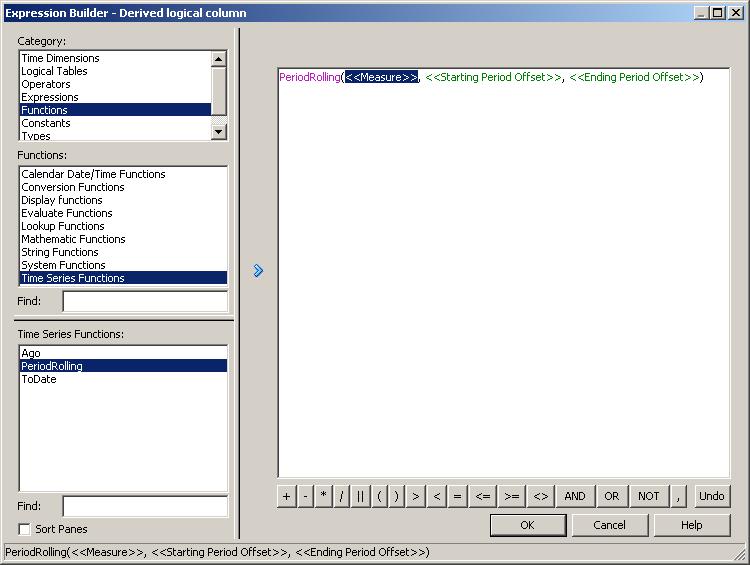
Syntax: PeriodRolling(<<Measure>>, <<Starting Period Offset>>, <<Ending Period Offset>>)
    Measure: represents the logical measure column from which you want to derive.
    Starting Period Offset: identify the first period used in the rolling aggregation.
    Ending Period Offset: Identify the last period used in the rolling aggregation.
2)What is time series wizard? When and how do you use it?
 1. We can do comparison for certain measures ( revenue.,sales etc.. ) for current year vs  previous year, we can do for month or week and day also.
 2. Identify the time periods need to be compared and then period table keys to the previous time period.
 3.The period table needs to contain a column that will contain “Year Ago” information.
 4.The fact tables needs to have year ago totals.
 5. To use the “Time series wizard”. After creating your business model right click the business model and click on “Time Series Wizard”.
6.The Time Series Wizard prompts you to create names for the comparison measures that it adds to the business model.
7.The Time Series Wizard prompts you to select the period table used for the comparison measures.
8.Select the column in the period table that provides the key to the comparison period. This column would be the column containing “Year Ago” information in the period table.
9.Select the measures you want to compare and then Select the calculations you want to generate. For ex: Measure: Total Dollars and calculations are Change and Percent change.
Once the Time series wizard is run the output will be:
a) Aliases for the fact tables (in the physical layer).
b) Joins between period table and alias fact tables.
c) Comparison measures.
d) Logical table sources.
10.In the General tab of the Logical table source etc you can find “Generated by Time Series Wizard” in the description section.
11.Then you can add these comparison measures to the presentation layer for your reports.
Ex: Total sales of current qtr vs previous qtr vs same qtr year ago.
3)Can we create time-series functions at front end?
A)yes, new feature added in 11g
4)ORA-12801: error signaled in parallel query server?
A)When the level key is a function column, you may have this error:
[nQSError: 10058] A general error has occurred. [nQSError: 17001] Oracle Error code: 12801, message:
ORA-12801: error signaled in parallel query server P000 ORA-01722: invalid number at OCI call OCIStmtExecute ....
a. The chronological column must have its values stored in a table column.
5)The query level ('Fiscal Year, Operational Year') must be a static level?
A)  [nQSError: 10058] A general error has occurred. [nQSError: 22046] To use AGO function, the query level
('Fiscal Year, Operational Year') must be a static level. (HY000)
a. When you use two different hierarchy for the time dimension,
  • you can't mix two levels which come from two different hierarchies.
  • Or you must create only one level.
6) can we mix Analytics function and OBIEE times function?
A)You can not mix an  database analytical function for instance lag with an ago or a to-date function otherwise you will receive this error.
State: HY000. Code: 10058. [NQODBC] [SQL_STATE: HY000] [nQSError: 10058] A general error has occurred.
[nQSError: 42015] Cannot function ship the following expression: Evaluate( LAG(%1,1) over (order by
%2),D903.c3, case when D903.c1 is not null then D903.c1 when D903.c2 is not null then D903.c2 end ) .
(HY000)
7) What is this chronological key ?
A)For defining a dimension to be a Time dimension, we need to have a chronological key. Chronological key is the key which is uniquely identifies the data at particular level whereas logical key is the key which is used to define the unique elements in each logical level.
a. Logical Level can have more than one key. When that is the case, specify the key that is primary of that level.
b. All other dimensions doesn't care about the order of the values in it.
e.g. In Region_Dim the values are north, south, west and east. Here nobody wants to see whether north comes first or south comes first. i.e. no order is required here.
c. In the case of Time Dimension there needs to be a particular order for all the values present in it.
e.g. 2010 is earliest and 2004 is older. Dec-10 is earliest and jan-10 is older. i.e. the values in the time dimension needs to follow a particular sorting order. So the chronological key is the key which tells the OBIEE that the data is increment based on the chronological column.
d. For defining a dimension to be a Time dimension, we need to have a chronological Key.
e.Then set the keys at each level, the hierarchy.
F. After doing these steps pull the Time Dimension to one of the folder in the Presentation Layer and after which when the column is pulled in the Analytic.
G. you get this output.https://blogger.googleusercontent.com/img/b/R29vZ2xl/AVvXsEhHe4IdPEngrP-m4rgxVzoUZ3hQSEHgcpoDmglYmGWNYSD59pmP665Iwh1ehYGoRrDd2k9kAB2n7qtOPeJFmBfhezOWPxm5G5VmVAqyq6o3d4KJnKu-DbZyl1tGeDzK41mZV5BNL49obYDQ/s1600/7.png
8) You can have inconsistent values when the Time/Calendar Dimension is not well build. Then which Rules you have to follow?
A) You have to follow this rules:
Key:
  • The chronological key of each level must be a real chronological key.
  • The chronological key of each level must not contain NULL values.
  • The chronological column must have its values stored in a table column and must not be the result of a function.
  • The foreign key of the time dimension which links to the fact table in the Business Model is not null.
Hierarchy:
  • Each sub-level must be contained in the above level. Each month belongs only to one year. A week can't be on two months.
  • Each sub-level must be present for the high level (All years must have 12 months).
  • All the time columns in your logical sql belongs to the right level of hierarchy. For instance, even if the week number is not the chronological key, the column must be in the week level of the time dimension.


Variables

Variables:
1. Why variables are needed  in OBIEE11G?
A) Variables are useful to handle dynamic scenarios in OBIEE11G.
2. How many types of variables are present in OBIEE11G?
A) We have mainly four types of variables
1. Repository variables.
2. Session variables.
3. Presentation variables.
4. Request variables.
3. What variables are defined in RPD?
A) Repository and session variables are defined in RPD
4. Where is the use of repository and session variables?
A) The repository and session variables are used in
a.RPD calculations.
b.RPD filters.
c. Report calculations.
d. Report filters.
e. Dashboard prompts.
5. Where are the presentation and request variables are defined?
A) Presentation and request variables are defined in Dashboard prompt.
6. Repository variables are also called as?
A) These variables are also called as Oracle BI server variables.
7. When we can update the repository variables?
A) Repository variables values will be updated whenever oracle BI server is restarted or started and based on schedule.
8. What is the syntax of repository variable?
A) syntax:VALUEOF(<VARIABLE_NAME>).
9. How many types of repository variables are present in OBIEE11G?
A) There are two repository variables in OBIEE11G:
a. Static.
b. Dynamic.
10. When we will go for static repository variable?
A) If we want to use a constant value in 'n'  no of  places then we will go for static variables.
a. Static variables are initialized in static repository variable dialog box.
11. What are the static predefined syntax variables for date?
A) The three static pre-defined syntax for date are:
a. Date.
b.Time.
c. Timestamp.
12. What variables are associated with initialization blocks?
A) Dynamic repository variables will be associated with initialization blocks.
13. What is an initialization block?
A) A SQL query is called an initialization block.
a. These initialization blocks will be executed with oracle bi server refresh and based on schedule of initialization block.
b. schedule option is available only for dynamic repository variable initialization block.
14. What is ROW WISE initialization blocks?
A) They are used to retrieve and initialization a list of values to a non system session variables.
a. Returns list of values separated by column.
Ex:CA:TEXAS
a. Used for implementing data security when one user normally belong to more than one group.
15. What is the difference between repository variables and session variables?
A)
REPOSITORY VARIABLES
SESSION VARIABLES
Thses variables are same for all users
Change from one user to user
These IB will run with OBIS start or restart based on schedule
These IB run at the time of user login
Static and dynamic
System and non system
Syntax:VALUEOF(VARIABLENAME)
Syntax:VALUEOF(NQ_SESSION.VARIABLE NAME)
These things are useful to capture max year,max month etc from database
Data security or row level security
16. What is a presentation variable?
A) Presentation variable is used to capture" user response".
17. Where we will use the presentation variables?
A) We will use the presentation variables in variable prompt.(upto 11.1.1.6) version only presentation variable.
18. What is the syntax for presentation variable?
A) presentation variable syntax:@{variable name}{(value)}{(format)}.
1. Here value and format are optional.
2. variable name is the name of the PV.
3. value is by default value.
4. Format is to convert one format to another format.
19. What is a request variable?
A) It is useful to to override  session variable values.
a. The name of the request variable must be same as the session variable.
20. Where we will define the request variable?
A) We will define the request variable in Dashboard prompt.
a. It is useful to send the values from report to RPD.
21. what is a session time?
A) Log out-Log in is called as session time.
a. Any application will support ‘N’ no of sessions.
b. Session variables will be populated separately for each and every session or user.
c. Receives values when users establish their sessions.
22. What is the syntax of session variables?
A) Syntax is VALUEOF(NQ_SESSION.Variablename).
23. How many types of session variables are present in OBIEE11G?
A) Session variables are divided into two types:
1. System variable.
2. Non-System variable.
24. What is system session variable?
A) These are predefined session variables used by oracle bi server for specific purpose such as authenticating users.
25. What are different types of session variables?
A) We have below system variables (CASE SENSITIVE AND MUST BE CAPITAL)
1. USER.
2. PASSWORD.
3. DISPLAYNAME.
4. GROUP.
ETC
a. These variables are useful in special cases such as authenticating user. These variables should not used for any other purpose(as a static variable name or dynamic variable name or non system session variable).
26. What is non system session variable?
A) These are application specific customized variables.
a. These variables required session initialization blocks.
b. Session initialization blocks will be executed when ever user login into analytic applications.